





nuke随笔
本文最后更新于 2026-07-09,文章内容可能已经过时。
Nuke随笔
节点
PostageStamp 链接某个节点
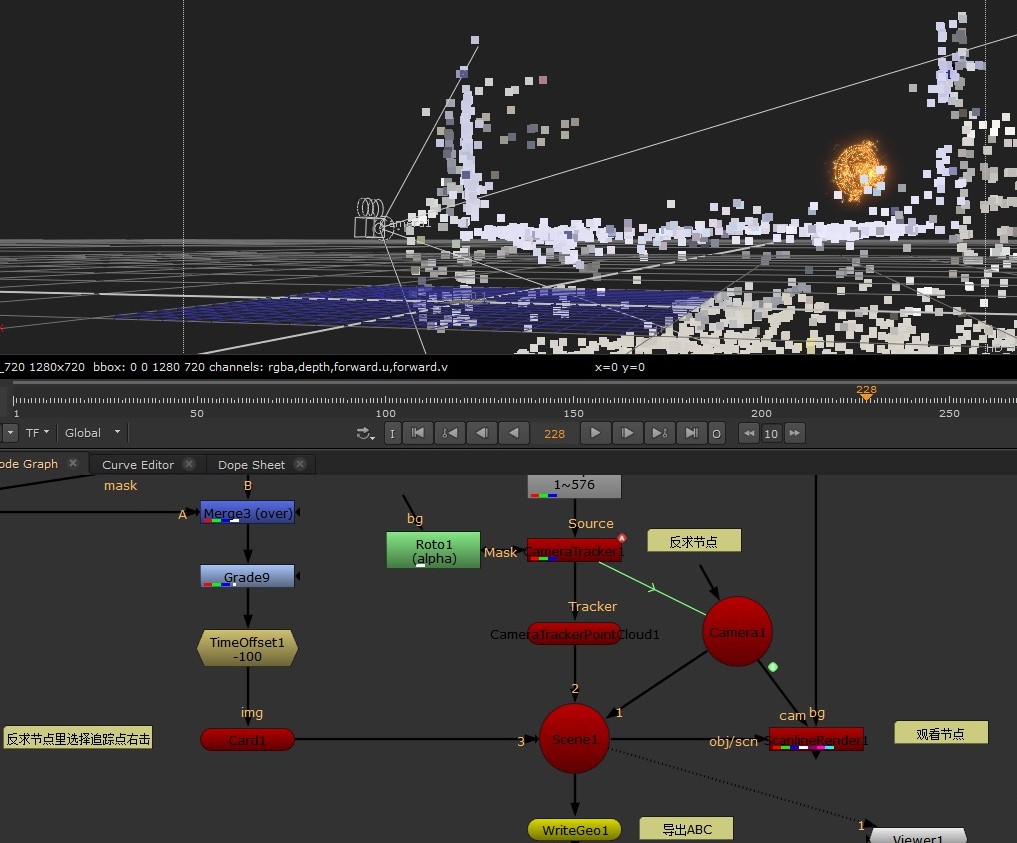
CameraTracker nuke相机反求
ScanlineRender 将相机背景以及其他物体一起观看
Card 将素材放入三维空间,可绑定在跟踪点上
Chromatik 色散节点(插件)
Reformat 重置分辨率,默认重置为项目设置的分辨率
Keyer 根据颜色自动计算Alpha
Clamp 将颜色Alpha重置到0-1的区间,realglow节点会根据Alpha来计算亮度,重置Alpha可以防止部分区域过曝
Roto 画蒙版
表达式
随机抖动
(random(seed,frame*frequency)*amplitude)+valueOffsetseed 表示种子,只要改变该值动画曲线将会在相同频率下不同 (random(2,frame*1)*1)+0 :
快捷键
批量替换路径更换的素材
按s调出nuke项目面版,点击Script Directory,自动识别当前路径
全选节点按Crel+Shift+/,上面填需要替换的路径下面填相对路径,如nuke源文件和render文件夹在同一层级下则替换成一个".",替换其他路径则直接替换路径
插件
有代码块的可以直接点击代码块右上角复制,然后去nuke里粘贴
RealGlow
set cut_paste_input [stack 0]
version 12.2 v3
push $cut_paste_input
Group {
 name realGlow2
 tile_color 0xffff00ff
 selected true
 xpos 8325
 ypos -7045
 addUserKnob {20 realGlow}
 addUserKnob {41 output T Plus.output}
 addUserKnob {41 tint T Multiply_tint.value}
 addUserKnob {7 brightness R 0 5}
 brightness 1.32
 addUserKnob {7 falloff R 1 5}
 falloff 1
 addUserKnob {7 saturation}
 saturation 1
 addUserKnob {6 effect_only l "effect only" +STARTLINE}
 addUserKnob {26 ""}
 addUserKnob {7 size R 0 100}
 size 19.5
 addUserKnob {41 mix T Plus.mix}
 addUserKnob {6 mask +STARTLINE}
}
 Input {
  inputs 0
  name Inputmask
  xpos -231
  ypos 629
  number 1
 }
set Nfb088400 [stack 0]
 Input {
  inputs 0
  name Inputimage
  xpos -542
  ypos 482
 }
 Dot {
  name Dot127
  xpos -508
  ypos 571
 }
set Nfb3e3800 [stack 0]
 Shuffle {
  in {{{parent.Plus.output}}}
  name Shuffle1
  label "\[value in]"
  xpos -441
  ypos 562
 }
set Nfb3e3400 [stack 0]
 Multiply {
  channels rgb
  value 0.2
  name Multiply_tint
  xpos -348
  ypos 568
 }
 Saturation {
  saturation {{parent.saturation}}
  name Saturation3
  xpos -348
  ypos 592
 }
 Merge2 {
  inputs 2
  operation mask
  name Merge1
  xpos -348
  ypos 629
  disable {{1-parent.mask}}
 }
 Dot {
  name Dot128
  xpos -314
  ypos 667
 }
set Nfb3e2400 [stack 0]
 Dot {
  name Dot140
  xpos -223
  ypos 667
 }
set Nfb3e2000 [stack 0]
 Dot {
  name Dot141
  xpos -130
  ypos 667
 }
set Nfb3e1c00 [stack 0]
 Dot {
  name Dot142
  xpos -34
  ypos 667
 }
set Nfb3e1800 [stack 0]
 Dot {
  name Dot143
  xpos 57
  ypos 667
 }
set Nfb3e1400 [stack 0]
 Dot {
  name Dot144
  xpos 146
  ypos 667
 }
set Nfb3e1000 [stack 0]
 Dot {
  name Dot145
  xpos 238
  ypos 667
 }
set Nfb3e0c00 [stack 0]
 Dot {
  name Dot146
  xpos 329
  ypos 667
 }
 Blur {
  channels rgba
  size {{parent.size*128}}
  name Blur8
  label "\[value size]"
  xpos 295
  ypos 685
 }
 Multiply {
  channels rgba
  value {{parent.brightness/(pow(parent.falloff,7))}}
  name Multiply82
  label "\[value value]"
  xpos 295
  ypos 721
 }
 Dot {
  name Dot218
  xpos 329
  ypos 925
 }
push $Nfb3e0c00
 Blur {
  channels rgba
  size {{parent.size*64}}
  name Blur7
  label "\[value size]"
  xpos 204
  ypos 685
 }
 Multiply {
  channels rgba
  value {{parent.brightness/(pow(parent.falloff,6))}}
  name Multiply78
  label "\[value value]"
  xpos 204
  ypos 721
 }
 Dot {
  name Dot204
  xpos 238
  ypos 901
 }
push $Nfb3e1000
 Blur {
  channels rgba
  size {{parent.size*32}}
  name Blur6
  label "\[value size]"
  xpos 112
  ypos 685
 }
 Multiply {
  channels rgba
  value {{parent.brightness/(pow(parent.falloff,5))}}
  name Multiply77
  label "\[value value]"
  xpos 112
  ypos 721
 }
 Dot {
  name Dot189
  xpos 146
  ypos 877
 }
push $Nfb3e1400
 Blur {
  channels rgba
  size {{parent.size*16}}
  name Blur5
  label "\[value size]"
  xpos 23
  ypos 685
 }
 Multiply {
  channels rgba
  value {{parent.brightness/(pow(parent.falloff,4))}}
  name Multiply76
  label "\[value value]"
  xpos 23
  ypos 721
 }
 Dot {
  name Dot176
  xpos 57
  ypos 853
 }
push $Nfb3e1800
 Blur {
  channels rgba
  size {{parent.size*8}}
  name Blur4
  label "\[value size]"
  xpos -68
  ypos 685
 }
 Multiply {
  channels rgba
  value {{parent.brightness/(pow(parent.falloff,3))}}
  name Multiply2
  label "\[value value]"
  xpos -68
  ypos 721
 }
 Dot {
  name Dot160
  xpos -34
  ypos 829
 }
push $Nfb3e1c00
 Blur {
  channels rgba
  size {{parent.size*4}}
  name Blur3
  label "\[value size]"
  xpos -164
  ypos 685
 }
 Multiply {
  channels rgba
  value {{parent.brightness/(pow(parent.falloff,2))}}
  name Multiply74
  label "\[value value]"
  xpos -164
  ypos 721
 }
 Dot {
  name Dot151
  xpos -130
  ypos 805
 }
push $Nfb3e2000
 Blur {
  channels rgba
  size {{parent.size*2}}
  name Blur2
  label "\[value size]"
  xpos -257
  ypos 685
 }
 Multiply {
  channels rgba
  value {{parent.brightness/parent.falloff}}
  name Multiply1
  label "\[value value]"
  xpos -257
  ypos 721
 }
 Dot {
  name Dot150
  xpos -223
  ypos 781
 }
push $Nfb3e2400
 Blur {
  channels rgba
  size {{parent.size}}
  name Blur1
  label "\[value size]"
  xpos -348
  ypos 685
 }
 Multiply {
  channels rgba
  value {{parent.brightness}}
  name Multiply73
  label "\[value value]"
  xpos -348
  ypos 721
 }
 Merge2 {
  inputs 2
  operation plus
  name Plus21
  xpos -348
  ypos 778
 }
 Merge2 {
  inputs 2
  operation plus
  name Plus23
  xpos -348
  ypos 802
 }
 Merge2 {
  inputs 2
  operation plus
  name Plus24
  xpos -348
  ypos 826
 }
 Merge2 {
  inputs 2
  operation plus
  name Plus25
  xpos -348
  ypos 850
 }
 Merge2 {
  inputs 2
  operation plus
  name Plus26
  xpos -348
  ypos 874
 }
 Merge2 {
  inputs 2
  operation plus
  name Plus32
  xpos -348
  ypos 898
 }
 Merge2 {
  inputs 2
  operation plus
  name Plus33
  xpos -348
  ypos 922
 }
push $Nfb3e3400
 Multiply {
  channels rgba
  value {{1-parent.effect_only}}
  name Multiply3
  xpos -441
  ypos 683
 }
push $Nfb3e3800
 ShuffleCopy {
  inputs 2
  in2 none
  red red
  green green
  blue blue
  out {{{parent.Plus.output}}}
  name ShuffleCopy1
  xpos -542
  ypos 683
 }
 Merge2 {
  inputs 2
  operation plus
  Bchannels {{{parent.Plus.output}}}
  output rgb
  name Plus
  xpos -542
  ypos 922
 }
set Nfb2c3800 [stack 0]
 Output {
  name Output
  xpos -542
  ypos 1043
 }
push $Nfb088400
push $Nfb2c3800
 Viewer {
  inputs 2
  fps 30
  input_number 1
  input_process false
  name Viewer1
  xpos -542
  ypos 1119
 }
end_group
/
角标
set cut_paste_input [stack 0]
version 12.2 v3
push $cut_paste_input
Group {
 name message1
 selected true
 xpos -144
 ypos 793
}
 Reformat {
  inputs 0
  format "1920 1080 0 0 1920 1080 1 HD_1080"
  resize none
  filter impulse
  black_outside true
  name Reformat64
  xpos -1569
  ypos 580
 }
 AddTimeCode {
  startcode 00:00:00:00
  metafps false
  frame 0
  useFrame true
  name AddTimeCode
  xpos -1569
  ypos 645
 }
 Text2 {
  font_size_toolbar 100
  font_width_toolbar 100
  font_height_toolbar 100
  message "\[clock format \[clock seconds] -format %d/%m/%Y]"
  old_message {{49 51 47 48 49 47 50 48 50 53}
    }
  old_expression_markers {{0 9}
    }
  box {59.5 28 246 61}
  transforms {{0 2}
    }
  cursor_position 47
  global_font_scale 0.33
  scale {1 1}
  cursor_initialised true
  autofit_bbox false
  initial_cursor_position {{59.5 61}
    }
  group_animations {{0} imported: 0 selected: items: "root transform/"}
  animation_layers {{1 11 960 540 0 0 1 1 0 0 0 0}
    }
  name Text_date1
  xpos -1569
  ypos 686
  cached true
 }
 Text2 {
  font_size_toolbar 100
  font_width_toolbar 100
  font_height_toolbar 100
  message "FrameRange: \[value root.first_frame] - \[value root.last_frame]"
  old_message {{70 114 97 109 101 82 97 110 103 101 58 32 49 48 49 32 45 32 49 54 52}
    }
  old_expression_markers {{12 14 18 20}
    }
  box {857.5 24 1156.5 58}
  transforms {{0 2}
    }
  global_font_scale 0.33
  scale {1 1}
  cursor_initialised true
  initial_cursor_position {{857.5 58}
    }
  group_animations {{0} imported: 0 selected: items: "root transform/"}
  animation_layers {{1 11 960 540 0 0 1 1 0 0 0 0}
    }
  name Text_timecode1
  xpos -1569
  ypos 729
  cached true
 }
 Text2 {
  font_size_toolbar 100
  font_width_toolbar 100
  font_height_toolbar 100
  message "Frame: \[frame]\n\[value root.format.r]*\[value root.format.t]"
  old_message {{70 114 97 109 101 58 32 49 48 49 10 49 57 50 48 42 49 48 56 48}
    }
  old_expression_markers {{7 9 11 14 16 19}
    }
  box {1732.5 -5 1895.5 62}
  transforms {{0 2}
    }
  cursor_position 37
  global_font_scale 0.33
  scale {1 1}
  cursor_initialised true
  initial_cursor_position {{1732.5 62}
    }
  group_animations {{0} imported: 0 selected: items: "root transform/"}
  animation_layers {{1 11 960 540 0 0 1 1 0 0 0 0}
    }
  name Text_frame1
  xpos -1569
  ypos 787
  cached true
 }
 Text2 {
  font_size_toolbar 100
  font_width_toolbar 100
  font_height_toolbar 100
  message " \[lindex \[split \[lindex \[split \[value root.name] /] end]  .] 0].\[lindex \[split \[lindex \[split \[value root.name] /] end]  .] 1]    "
  old_message {{32 72 70 76 89 50 95 72 70 49 52 95 83 67 49 53 95 48 50 50 95 118 48 51 46 110 107 32 32 32 32}
    }
  old_expression_markers {{1 23 25 26}
    }
  box {50.5 1005 185.5 1039}
  transforms {{0 2}
    }
  cursor_position 130
  global_font_scale 0.33
  scale {1 1}
  cursor_initialised true
  initial_cursor_position {{50.5 1039}
    }
  group_animations {{0} imported: 0 selected: items: "root transform/"}
  animation_layers {{1 11 960 540 0 0 1 1 0 0 0 0}
    }
  name Text_shotname1
  xpos -1569
  ypos 829
  cached true
  addUserKnob {20 User}
 }
 Text2 {
  font_size_toolbar 100
  font_width_toolbar 100
  font_height_toolbar 100
  message "FPS: \[value root.fps]"
  old_message {{70 80 83 58 32 50 53}
    }
  old_expression_markers {{5 6}
    }
  box {1757 1014.9875 1927 1049.0125}
  transforms {{0 2}
    }
  cursor_position 21
  global_font_scale 0.33
  scale {1 1}
  cursor_initialised true
  autofit_bbox false
  initial_cursor_position {{1796 1059}
    }
  group_animations {{0} imported: 0 selected: items: "root transform/"}
  animation_layers {{1 11 960 540 0 0 1 1 0 0 0 0}
    }
  name Text_fps1
  xpos -1569
  ypos 881
  cached true
 }
set N8d297800 [stack 0]
 Reformat {
  resize distort
  name Reformat1
  xpos -1569
  ypos 938
 }
 Input {
  inputs 0
  name Input
  xpos -1250
  ypos 494
 }
 Merge2 {
  inputs 2
  name Merge1
  xpos -1250
  ypos 938
 }
 Output {
  name Output
  xpos -1250
  ypos 1075
 }
push $N8d297800
 Viewer {
  frame_range 100-100
  fps 33
  name Viewer1
  xpos -1399
  ypos 1075
 }
end_group色散
#! /Applications/Nuke5.1v5/Nuke5.1v5.app/Contents/MacOS/Nuke5.1v5 -nx
version 5.1500
Gizmo {
 note_font "Verdana Bold"
 note_font_size 13
 note_font_color 0x7f1f00ff
 addUserKnob {20 aKKROMATISM l aKROMATISM}
 addUserKnob {41 multiplier l AberrationMultiplier T Dot1.multiplier}
 addUserKnob {41 mixRay T moxDot.mixRay}
 addUserKnob {41 which T Switch1.which}
 addUserKnob {26 ""}
 addUserKnob {26 "" l _ T "st.Rub's Akromatism\[6.1.2009]"}
 addUserKnob {26 ""}
 addUserKnob {20 about}
 addUserKnob {26 "" l _ T "If you need any updates, or suggestions, just contact\n\ndonald@donaldstrubler.com"}
}
 Keymix {
  inputs 0
  invertMask true
  mix 0
  name Keymix1
  xpos -160
  ypos 109
 }
 Input {
  inputs 0
  name Input1
  xpos -133
  ypos -363
 }
 Dot {
  name Dot2
  xpos -99
  ypos -292
 }
set N19953c10 [stack 0]
 GodRays {
  channels {-rgba.red rgba.green -rgba.blue}
  scale {{parent.GodRays8.scale}}
  center {{parent.GodRays5.center.x} {parent.GodRays5.center.y}}
  name GodRays6
  xpos -15
  ypos -189
 }
 GodRays {
  channels {rgba.red -rgba.green -rgba.blue}
  scale {{parent.GodRays5.scale}}
  center {{parent.GodRays6.center.x} {parent.GodRays6.center.y}}
  name GodRays7
  xpos -15
  ypos -141
  addUserKnob {20 User}
  addUserKnob {4 sasdasd M {Read1 ""}}
 }
push $N19953c10
 GodRays {
  channels {-rgba.red -rgba.green rgba.blue}
  scale {{(Dot1.multiplier)+1 i}}
  center {{(format.width)/2 i} {(format.height)/2 i}}
  name GodRays8
  xpos -117
  ypos -187
 }
 GodRays {
  channels {-rgba.red rgba.green -rgba.blue}
  scale {{parent.GodRays2.scale i}}
  center {{parent.GodRays8.center.x i} {parent.GodRays8.center.y i}}
  name GodRays5
  xpos -117
  ypos -140
  addUserKnob {20 User}
  addUserKnob {4 sasdasd M {Read1 ""}}
 }
push $N19953c10
 GodRays {
  channels {-rgba.red -rgba.green rgba.blue}
  scale {{(Dot1.multiplier)+1 i}}
  center {{(format.width)/2 i} {(format.height)/2 i}}
  name GodRays1
  xpos -229
  ypos -178
 }
 GodRays {
  channels {rgba.red -rgba.green -rgba.blue}
  scale {{((Dot1.multiplier)*(-1))+1 i}}
  center {{parent.GodRays1.center.x i} {parent.GodRays1.center.y i}}
  name GodRays2
  xpos -229
  ypos -139
  addUserKnob {20 User}
  addUserKnob {4 sasdasd M {Read1 ""}}
 }
 Switch {
  inputs 3
  which 2
  name Switch1
  xpos -104
  ypos -70
  addUserKnob {20 User}
  addUserKnob {41 which_1 l which T Switch1.which}
 }
 GodRays {
  scale {{((moxDot.mixRay)*.05)+1}}
  center {{width/2} {height/2}}
  name GodRays3
  xpos -104
  ypos -24
  addUserKnob {20 User}
  addUserKnob {7 mult}
  mult 1
 }
 Blur {
  size 0.6
  name Blur1
  xpos -63
  ypos 66
 }
 Output {
  name Output1
  xpos -104
  ypos 229
 }
 Dot {
  inputs 0
  name Dot1
  xpos -297
  ypos -172
  addUserKnob {20 User}
  addUserKnob {7 multiplier R -0.1 0.1}
  multiplier -0.036
 }
 Radial {
  inputs 0
  cliptype none
  area {0 0 {format.width i} {format.height i}}
  softness 0.18
  name Radial1
  xpos 152
  ypos -270
  hide_input true
 }
 Blur {
  size 300
  quality 30
  name Blur3
  xpos 152
  ypos -223
 }
 Grade {
  blackpoint 0.015
  whitepoint 0.4
  name Grade1
  xpos 152
  ypos -166
 }
 Dot {
  inputs 0
  name moxDot
  xpos 259
  ypos 11
  addUserKnob {20 User}
  addUserKnob {7 mixRay}
  mixRay 0.065
 }
 Viewer {
  inputs 0
  name Viewer1
  xpos 32
  ypos 229
 }
end_group扭曲
set cut_paste_input [stack 0]
version 10.5 v2
push 0
push $cut_paste_input
mmDisplace {
 inputs 2
 name mmDisplace1
 label displacement
 selected true
 xpos 1338
 ypos 2741
 uv_scale 2
}
插件集
nuke蓝宝石插件
sapphire-ofx-install-10.1-CE.exe
蓝宝石中英对照
1)   “通道转换         /S_ChannelSwitcher”效果

2)   “色度锁定     /S_ClampChroma”效果

3)   “双色调   /S_DuoTone”效果

4)   “伽马值 /S_Gamma”效果

5)   “调整高亮  /S_Hotspots”效果

6)   “HSB           /S_HueSatBright”效果

7)   “反转    /S_Invert”效果

8)   “单色调      /S_Monochrome”效果

9)   “四色调    /S_QuadTone”效果

10)   “显示故障颜色   /S_ShowBadColors”效果

11)   “阈值       /S_Threshold”效果

12)   “着色  /S_Tint”效果

13)   “三色调   /S_TriTone”效果

14)   “磨皮    /S_Beauty”效果

15)   “模糊  /S_Blur”效果

16)   “通道模糊      /S_BlurChannels”效果

17)   “色度模糊    /S_BlurChroma”效果

18)   “方向模糊         /S_BlurDirectional”效果

19)   “变形运动模糊  /S_BlurMoCurves”效果

20)   “区域运动模糊/S_BlurMotion”效果

21)   “卷积      /S_Convolve”效果

22)   “卷积计算      /S_ConvolveComp”效果

23)   “去条纹  /S_Deband”效果

24)   “色散虚焦模糊  /S_DefocusPrism”效果

25)   “边缘意识模糊   /S_EdgeAwareBlur”效果

26)   “边缘模糊  /S_EdgeBlur”效果

27)   “去除颗粒     /S_GrainRemove”效果

28)   “中值    /S_Median”效果

29)   “虚焦模糊     /S_RackDefocus”效果

30)   “双层虚焦模糊/S_RackDfComp”效果

31)   “锐化     /S_Sharpen”效果

32)   “柔焦       /S_SoftFocus”效果

33)   “景深   /S_ZBlur”效果

34)   “景深卷积   /S_ZConvolve”效果

35)   “景深虚焦  /S_ZDefocus”效果

36)   “效果库  /S_Effect”效果

37)   “过渡        /S_Transition”效果

38)   “边缘发光   /S_EdgeFlash”效果

39)   “图层   /S_Layer”效果

40)   “数学计算 /S_MathOps”效果

41)   “蒙版计算  /S_MatteOps”效果

42)   “蒙版计算并叠加/S_MatteOpsComp”效果

43)   “S_ZComp”效果

44)   “扭曲     /S_Distort”效果

45)   “模糊扭曲     /S_DistortBlur”效果

46)   “色度扭曲       /S_DistortChroma”效果

47)   “RGB扭曲     /S_DistortRGB”效果

48)   “无限变焦(推荐)/S_InfiniteZoom”效果

49)   “摇晃   /S_Shake”效果

50)   “拉伸帧边缘         /S_StretchFrameEdges”效果

51)   “噪波变形    /S_WarpBubble”效果

52)   “噪波变形2    /S_WarpBubble2”效果

53)   “色度扭曲2   /S_WarpChroma”效果

54)   “边角定位变形   /S_WarpCornerPin”效果

55)   “水波纹     /S_WarpDrops”效果

56)   “鱼眼镜头     /S_WarpFishEye”效果

57)   “放大镜状变形 /S_WarpMagnify”效果

58)   “透视变形         /S_WarpPerspective”效果

59)   “圆盘状扭曲 /S_WarpPolar”效果

60)   “水波纹涟漪  /S_WarpPuddle”效果

61)   “膨胀变形  /S_WarpPuff”效果

62)   “复制后变形  /S_WarpRepeat”效果

63)   “扭曲变换       /S_WarpTransform”效果

64)   “漩涡变形    /S_WarpVortex”效果

65)   “波浪       /S_WarpWaves”效果

66)   “波浪2       /S_WarpWaves2”效果

67)   “光斑         /S_BokehLights”效果

68)   “投射阴影    /S_DropShadow”效果

69)   “边缘发光2 /S_EdgeRays”效果

70)   “闪光灯      /S_Flashbulbs”效果

71)   “炫光   /S_Glare”效果

72)   “闪耀   /S_Glint”效果

73)   “彩虹色闪耀    /S_GlintRainbow”效果

74)   “辉光  /S_Glow”效果

75)   “条纹光斑  /S_GlowAura”效果

76)   “发光暗部   /S_GlowDarks”效果

77)   “辉光2     /S_GlowDist”效果

78)   “发光边缘   /S_GlowEdges”效果

79)   “发光噪点   /S_GlowNoise”效果

80)   “发光摄像管    /S_GlowOrthicon”效果

81)   “多层色散透射 /S_GlowRainbow”效果

82)   “彩色光环   /S_GlowRings”效果

83)   “镜头光晕   /S_LensFlare”效果

84)   “镜头光晕自动跟踪    /S_LensFlareAutoTrack”效果

85)   “灯光3D   /S_Light3D”效果

86)   “漏光       /S_LightLeak”效果

87)   “放射光/S_Rays”效果

88)   “聚光灯     /S_SpotLight”效果

89)   “条纹光   /S_Streaks”效果

90)   “景深光 /S_ZGlow”效果

91)   “极光    /S_Aurora”效果

92)   “水波纹效果/S_Caustics”效果

93)   “云层    /S_Clouds”效果

94)   “彩色平滑云层       /S_CloudsColorSmooth”效果

95)   “多色彩云层       /S_CloudsMultColor”效果

96)   “透视云层           /S_CloudsPerspective”效果

97)   “色散噪波     /S_CloudsPsyko”效果

98)   “旋涡状噪波    /S_CloudsVortex”效果

99)   “渐变      /S_Gradient”效果

100)   “复杂渐变       /S_GradientMulti”效果

101)   “径向渐变        /S_GradientRadial”效果

102)   “网格  /S_Grid”效果

103)   “污渍    /S_Grunge”效果

104)   “激光束     /S_LaserBeam”效果

105)   “月亮  /S_Luna”效果

106)   “枪口的闪光   /S_MuzzleFlash”效果

107)   “夜晚的天空/S_NightSky”效果

108)   “形状   /S_Shape”效果

109)   “星光      /S_Sparkles”效果

110)   “多彩星光       /S_SparklesColor”效果

111)   “细胞纹理      /S_TextureCells”效果

112)   “色度螺旋纹理         /S_TextureChromaSpiral”效果

113)   “纹理流动     /S_TextureFlux”效果

114)   “褶皱纹理       /S_TextureFolded”效果

115)   “环状纹理      /S_TextureLoops”效果

116)   “微型纹理      /S_TextureMicro”效果

117)   “摩尔纹        /S_TextureMoire”效果

118)   “神经元纹理      /S_TextureNeurons”效果

119)   “浮雕纹理            /S_TextureNoiseEmboss”效果

120)   “油漆纹理           /S_TextureNoisePaint”效果

121)   “等离子体纹理   /S_TexturePlasma”效果

122)   “点状纹理      /S_TextureSpots”效果

123)   “瓷砖纹理      /S_TextureTiles”效果

124)   “编织状纹理    /S_TextureWeave”效果

125)   “闪电 /S_Zap”效果

126)   “闪电3    /S_ZapFrom”效果

127)   “闪电2  /S_ZapTo”效果

128)   “油漆涂料   /S_AutoPaint”效果

129)   “带通滤波  /S_BandPass”效果

130)   “漂白          /S_BleachBypass”效果

131)   “冲刷   /S_Brush”效果

132)   “卡通     /S_Cartoon”效果

133)   “卡通绘画      /S_CartoonPaint”效果

134)   “交叉线      /S_Crosshatch”效果

135)   “弥散     /S_Diffuse”效果

136)   “画面损坏       /S_DigitalDamage”效果

137)   “狗的视力   /S_DogVision”效果

138)   “边缘着色      /S_EdgeColorize”效果

139)   “边缘检测    /S_EdgeDetect”效果

140)   “双层边缘检测      /S_EdgeDetectDouble”效果

141)   “边缘方向          /S_EdgesInDirection”效果

142)   “浮雕    /S_Emboss”效果

143)   “浮雕扭曲       /S_EmbossDistort”效果

144)   “浮雕玻璃     /S_EmbossGlass”效果

145)   “浮雕光泽     /S_EmbossShiny”效果

146)   “蚀刻版画 /S_Etching”效果

147)   “画面损坏2   /S_FilmDamage”效果

148)   “胶片效果    /S_FilmEffect”效果

149)   “圆形复眼        /S_FlysEyeCircles”效果

150)   “六边形复眼  /S_FlysEyeHex”效果

151)   “矩形复眼     /S_FlysEyeRect”效果

152)   “颗粒   /S_Grain”效果

153)   “随机颗粒     /S_GrainStatic”效果

154)   “双色点阵  /S_HalfTone”效果

155)   “彩色点阵       /S_HalfToneColor”效果

156)   “双色环形点阵   /S_HalfToneRings”效果

157)   “模拟图片损坏/S_JpegDamage”效果

158)   “万花筒   /S_Kaleido”效果

159)   “万花筒2       /S_KaleidoPolar”效果

160)   “万花筒3        /S_KaleidoRadial”效果

161)   “马赛克  /S_Mosaic”效果

162)   “色调分离   /S_Posterize”效果

163)   “伪彩色       /S_PseudoColor”效果

164)   “水面油渍    /S_PsykoBlobs”效果

165)   “条纹油渍      /S_PsykoStripes”效果

166)   “罗马瓷砖   /S_RomanTile”效果

167)   “扫描线     /S_ScanLines”效果

168)   “单色扫描线     /S_ScanLinesMono”效果

169)   “素描    /S_Sketch”效果

170)   “曝光过度  /S_Solarize”效果

171)   “条带滑动    /S_StripSlide”效果

172)   “瓷砖碎片      /S_TileScramble”效果

173)   “画面损坏3 /S_TVDamage”效果

174)   “暗角      /S_Vignette”效果

175)   “复古双色调          /S_VintageColor2Strip”效果

176)   “复古三色调          /S_VintageColor3Strip”效果

177)   “扭曲单色 /S_Zebrafy”效果

178)   “扭曲彩色      /S_ZebrafyColor”效果

179)   “指数雾气         /S_ZFogExponential”效果

180)   “线性雾气    /S_ZFogLinear”效果

181)   “减少溶解       /S_CutToDissolve”效果

182)   “延迟反馈  /S_Feedback”效果

183)   “变形延迟反馈    /S_FeedbackBubble”效果

184)   “扭曲反馈         /S_FeedbackDistort”效果

185)   “去除场       /S_FieldRemove”效果

186)   “闪烁     /S_Flicker”效果

187)   “同步闪烁      /S_FlickerMatch”效果

188)   “闪烁颜色匹配       /S_FlickerMatchColor”效果

189)   “闪烁蒙版匹配       /S_FlickerMatchMatte”效果

190)   “闪烁蒙版颜色匹配      /S_FlickerMchMatteColor”效果

191)   “去除闪烁       /S_FlickerRemove”效果

192)   “去除颜色闪烁        /S_FlickerRemoveColor”效果

193)   “去除指定区域的闪烁  /S_FlickerRemoveMatte”效果

194)   “去除指定区域颜色闪烁 /S_FlickerRmMatteColor”效果

195)   “冻结帧       /S_FreezeFrame”效果

196)   “静帧      /S_GetFrame”效果

197)   “抖动帧        /S_JitterFrames”效果

198)   “运动检测      /S_MotionDetect”效果

199)   “近似颜色      /S_NearestColor”效果

200)   “随机播放     /S_RandomEdits”效果

201)   “修复帧        /S_RepairFrames”效果

202)   “修改帧率/S_Retime”效果

203)   “反向播放     /S_ReverseClip”效果

204)   “区域反向播放  /S_ReverseEdits”效果

205)   “帧平均(推荐) /S_TimeAverage”效果

206)   “时间位移      /S_TimeDisplace”效果

207)   “时间划分   /S_TimeSlice”效果

208)   “RGB颜色偏移  /S_TimeWarpRGB”效果

209)   “拖影    /S_Trails”效果

210)   “拖影弥散       /S_TrailsDiffuse”效果

211)   “卡片翻转  /S_CardFlip”效果

212)   “溶解      /S_Dissolve”效果

213)   “油漆涂料溶解       /S_DissolveAutoPaint”效果

214)   “溶解模糊      /S_DissolveBlur”效果

215)   “溶解泡沫        /S_DissolveBubble”效果

216)   “溶解虚焦         /S_DissolveDefocus”效果

217)   “溶解扩散         /S_DissolveDiffuse”效果

218)   “溶解扭曲         /S_DissolveDistort”效果

219)   “溶解边缘射线      /S_DissolveEdgeRays”效果

220)   “溶解胶片      /S_DissolveFilm”效果

221)   “溶解闪光灯          /S_DissolveFlashbulbs”效果

222)   “溶解炫光       /S_DissolveGlare”效果

223)   “溶解发光       /S_DissolveGlint”效果

224)   “溶解彩虹光         /S_DissolveGlintRainbow”效果

225)   “溶解辉光      /S_DissolveGlow”效果

226)   “溶解镜头光晕       /S_DissolveLensFlare”效果

227)   “溶解亮度      /S_DissolveLuma”效果

228)   “溶解水波纹涟漪  /S_DissolvePuddle”效果

229)   “溶解射线      /S_DissolveRays”效果

230)   “溶解摇晃       /S_DissolveShake”效果

231)   “溶解斑块         /S_DissolveSpeckle”效果

232)   “溶解静电        /S_DissolveStatic”效果

233)   “溶解瓷砖       /S_DissolveTiles”效果

234)   “溶解漩涡        /S_DissolveVortex”效果

235)   “溶解波浪       /S_DissolveWaves”效果

236)   “溶解闪电     /S_DissolveZap”效果

237)   “电影胶卷  /S_FilmRoll”效果

238)   “频闪        /S_FlutterCut”效果

239)   “幻灯片          /S_StripSlideTransition”效果

240)   “漂亮3D   /S_Swish3D”效果

241)   “漂亮平移  /S_SwishPan”效果

242)   “切换电视频道     /S_TVChannelChange”效果

243)   “擦拭斑点   /S_WipeBlobs”效果

244)   “擦拭泡沫    /S_WipeBubble”效果

245)   “擦拭细胞   /S_WipeCells”效果

246)   “擦拭方格     /S_WipeChecker”效果

247)   “擦拭圆形    /S_WipeCircle”效果

248)   “擦拭时钟   /S_WipeClock”效果

249)   “擦拭云层    /S_WipeClouds”效果

250)   “擦拭弥漫     /S_WipeDiffuse”效果

251)   “擦拭圆点  /S_WipeDots”效果

252)   “擦拭双楔形       /S_WipeDoubleWedge”效果

253)   “擦拭熔化  /S_WipeFlux”效果

254)   “擦拭四边        /S_WipeFourWedges”效果

255)   “线性擦拭  /S_WipeLine”效果

256)   “波纹擦拭   /S_WipeMoire”效果

257)   “像素擦拭      /S_WipePixelate”效果

258)   “液体擦拭    /S_WipePlasma”效果

259)   “碎片擦拭        /S_WipePointalize”效果

260)   “矩形擦拭       /S_WipeRectangle”效果

261)   “环形擦拭   /S_WipeRings”效果

262)   “星形擦拭  /S_WipeStar”效果

263)   “条纹擦拭     /S_WipeStripes”效果

264)   “六边形擦拭 /S_WipeTiles”效果

265)   “编织擦拭   /S_WipeWeave”效果

266)   “楔形擦拭   /S_WipeWedge”效果
评论
隐私政策
你无需删除空行,直接评论以获取最佳展示效果
.png?width=400)